
How to Change Google Knowledge Panel for the Better
Your Google Knowledge Panel shapes first impressions — here is exactly how to control the information it displays for your business or personal brand.


- The Knowledge Graph and Knowledge Panel are different: one is hidden infrastructure, the other is visible in search.
- Business Knowledge Panels can be influenced by keeping your Google My Business profile accurate and verified.
- Personal Knowledge Panels are granted by Google based on notability — there is no direct application process.
- Adding structured data markup on a high-authority domain improves your chances of appearing in the Knowledge Graph.
- To influence your Knowledge Panel, focus on the data sources Google pulls from, such as Wikipedia and authoritative databases.
Google Knowledge Panels pull data from the Knowledge Graph, Wikipedia, and other sources, and can be influenced by changing those underlying data sources. Business panels are easier to update via Google My Business, while personal panels depend on demonstrated notability. Understanding the difference between the Knowledge Graph and the Knowledge Panel is essential to improving what appears in search results.
How to Change Your Google Knowledge Panel for the Better
-
1
Understand the difference between the Knowledge Graph and Knowledge Panel
The Knowledge Graph is a behind-the-scenes technology that stores and connects billions of data points to help Google understand relationships between entities. The Knowledge Panel is the visible information box that appears on the right side of search results, pulling data from the Knowledge Graph, Wikipedia, and other sources. To change what appears in your Knowledge Panel, you need to update the underlying sources it draws from.
-
2
Identify which type of Knowledge Panel applies to you
There are two main types: Local Panels for businesses and Branded or Personal Panels for individuals and personal brands. Business panels are generally easier to influence because they pull directly from your Google Business Profile. Personal panels depend on Google determining you are notable enough, often requiring a Wikipedia presence or demonstrated digital authority and industry recognition.
-
3
Set up and optimize your Google Business Profile
Open a Google Business Profile account and ensure all business information is accurate and current, including hours, photos, and contact details. Verify your website with Google Search Console and add structured data markup on a high-authority domain. As of 2024, Google has enhanced verification processes including video verification, with approval timelines of 7 to 14 business days for standard verification and 2 to 4 weeks for video verification.
-
4
Build and maintain authoritative data sources
Tier 1 sources like Wikipedia and your Google Business Profile carry the most weight in Knowledge Panel creation and should be your primary focus. Ensure your official name, logo, social profile information, physical location, and contact details are consistent and accurate across all platforms. The 2024 algorithm update prioritizes verified, authoritative sources more heavily, so consistent and up-to-date information across multiple platforms will improve your Knowledge Panel representation.
-
5
Keep digital information consistent across all touchpoints
Google's 2024 AI integration means it better understands business context, so consistent messaging across your website, social profiles, and directory listings has a greater impact on Knowledge Panel accuracy. Make sure your business details, marketing information, and announcements are synchronized and regularly updated. For personal brands, building digital authority and industry recognition across multiple verified platforms can strengthen your panel eligibility.
-
6
Leverage 2024 visual and content enhancements
Google's March 2024 core algorithm update introduced improved image carousels with higher-resolution images and better contextual relevance. Enhanced business information integration now allows for real-time updates from your Google Business Profile, including current hours and special announcements. Take advantage of these features by keeping your profile media and announcements fresh and relevant to improve how your Knowledge Panel displays.
Google Knowledge Panel pulls information from many sources. It can be changed to some degree. Here’s how.
The Knowledge Graph is a technology created by Google that is a vast collection of interconnected data points that helps Google understand the relationships between different entities on the web. Results from Knowledge Graph and other sources appear in the Google Knowledge Panel. Note that the two are different things. One you cannot see, the other you can. To change the Knowledge Panel, change the information from where it gets its data. This isn’t always possible, but sometimes it is.
There are two main types of Knowledge Panels:
- Local Panels: Local Panels are associated with businesses. This type of Knowledge Panel is generally easier to change because Google pulls information directly from your Google My Business account. As of 2024, Google has enhanced verification processes including video verification and improved document requirements, with typical approval timelines of 7-14 business days for standard verification and 2-4 weeks for video verification.
- Branded or Personal Panels: Google must determine that you are notable enough to warrant a Knowledge Panel for your personal brand. Since notability can be difficult to build, Branded or Personal Panels can be more difficult to change, but there are still steps you can take to influence what information appears on your Knowledge Panel. Google’s 2024 updates have improved verification for personal brands and thought leaders, with new criteria that consider digital authority and industry recognition beyond traditional Wikipedia requirements.
What is the Knowledge Graph? (K. Graph and K. Panel are different)
- The Knowledge Graph works quietly in the background to connect relevant details about people, places, and things so that search results are relevant and accurate.
- It displays search results with what it calculates to be the most commonly sought-after information based on search phrases and click behavior. It highlights relevant data using information boxes and image carousels.
The Knowledge Graph is intended to be a databank that stores, organizes, and connects billions of pieces of data so that users get the most relevant results for their intended searches.
What is the Knowledge Panel?
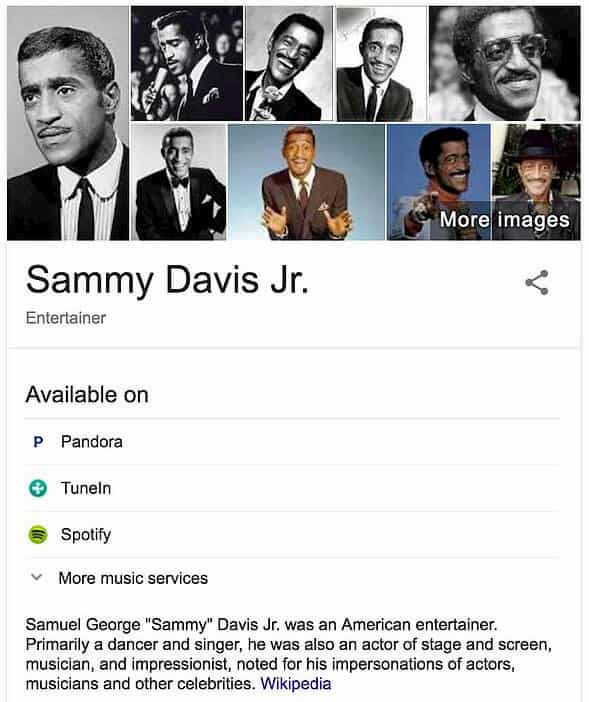
Knowledge Panel pulls information from various sources, including the Knowledge Graph, Wikipedia, and many other sources, to create a handy above-the-fold information space. It looks like this:

It appears on the right side of search engine results. Google pulls relevant information depending on the search query, which means that different types of Knowledge Panels will show different types of information. The business Knowledge Panel example below is quite different from the Knowledge Panel for the person above.
Get a Free Reputation Assessment
Find out what people see when they search for you online. No obligation — results in 24 hours.
Personal Knowledge Panels
Branded or personal panels will appear in your search results if Google determines you are notable enough for one. There is no application process. Most personal panels appear once you have a Wikipedia page, but that is not the only criterion.
Business Knowledge Panels
Unlike personal panels, there are some steps you can take to increase your chances of getting one. Here are a few things you can do to increase your chances of adding a knowledge panel to your business’s search results:
- Open a Google My Business account. Make sure to keep all of your business information up to date, including opening hours and photos.
- Verify your website with Google Search Console.
- Optimize your website. Add structured data markup, and make sure it is working properly and on a high-authority domain.
Knowledge Graph SEO
There is no direct way to apply search engine optimization techniques to Knowledge Graph, but the data sources it uses can be manipulated.
Google tends to pull information from established databases like Wikipedia; however, there are a few ways to increase your chances of appearing in the Knowledge Graph. Start with improving site attributes like:
- Business details like physical location and contact information
- Marketing details like your official name, logo, and social profile info
2024 Algorithm Updates and New Features
Google’s March 2024 core algorithm update significantly impacted how Knowledge Panels function and display information. The update introduced enhanced AI integration that better understands context and entity relationships, leading to more accurate and comprehensive Knowledge Panel displays.
Key changes include new visual elements such as improved image carousels that now feature higher-resolution images and better contextual relevance. Enhanced business information integration allows for real-time updates from Google Business Profile data, including current hours, special announcements, and customer interaction features.
The algorithm now prioritizes verified, authoritative sources more heavily than before, with updated data source weighting that emphasizes recent, accurate information over older content. This means businesses and individuals with consistently updated, verified information across multiple platforms will see improved Knowledge Panel representation.
For small business owners, these changes mean that maintaining current information across all digital touchpoints is more critical than ever. The AI integration also means that Google better understands business context, so consistent messaging and accurate details across your website, social profiles, and directory listings will have a greater impact on your Knowledge Panel accuracy.
Knowledge Graph data sources
Based on the opinions of search engine optimization professionals, here are the sources Google uses to populate its Knowledge Panel results, organized by priority and impact:
Tier 1 Sources (Highest Impact)
These sources carry the most weight in Knowledge Panel creation and should be your primary focus:
- Wikipedia – The most authoritative source for entity information
- Google Business Profile – Essential for local businesses and direct Google integration
- Official website – Your primary digital presence with structured data
- Wikidata – Structured data repository that feeds multiple platforms
Tier 2 Sources (Significant Impact)
These sources provide important supporting information and should be optimized consistently:
- Social media profiles (LinkedIn, Facebook, Twitter) – Professional and social validation
- Google Maps – Location and business verification
- Industry directories – Sector-specific authority and credibility
- Google Reviews – Customer feedback and business reputation
Tier 3 Sources (Supporting Impact)
These sources provide additional context and should be maintained for comprehensive coverage:
- Other reviews (Yelp, TripAdvisor)
- Google News and media mentions
- Government websites (White House, FDA, USDA)
- Professional databases (IMDb, Crunchbase, Google Scholar)
- Reference sources (CIA World Factbook, Google Books)
- Additional platforms (OpenStreetMap, AllMusic, Reddit)
Wikipedia, Wikidata, Google Business Profile, and other sources can be changed by a user. Most other data sources cannot be directly controlled, but you can influence them through consistent information management and strategic content creation.
To change Google Knowledge Panel, change the source data or the search engine relevance of the target content. For example, if you want to change images that are in the Google Knowledge Panel, they have to be relevant. To make certain images relevant, use image SEO.
Actionable Steps to Improve Your Knowledge Panel
Here are specific, step-by-step actions small business owners can take to improve their Knowledge Panel presence, organized by timeline and priority:
Immediate Actions (0-30 days)
- Claim and optimize your Google Business Profile: Ensure all information is accurate, complete, and current. Upload high-quality photos, add business hours, and respond to reviews promptly.
- Ensure NAP consistency: Make sure your Name, Address, and Phone number are identical across all Tier 1 and Tier 2 sources, including your website, social profiles, and directory listings.
- Upload high-quality images: Add professional photos to your Google Business Profile and website with proper alt text and file names that include your business name and relevant keywords.
- Verify your website with Google Search Console: This establishes your official website as an authoritative source and provides valuable insights into how Google sees your business.
Medium-term Actions (1-3 months)
- Create or update your Wikipedia page: If you meet notability requirements, create a well-sourced Wikipedia page. If you already have one, ensure it’s current and properly referenced.
- Optimize website structured data: Implement schema markup for your business type, including Organization, LocalBusiness, or Person schema as appropriate.
- Build authoritative backlinks: Secure mentions and links from industry publications, local news outlets, and professional associations to increase your digital authority.
- Optimize social media profiles: Ensure all Tier 2 social platforms have complete, consistent information and regular activity that demonstrates expertise in your field.
Long-term Actions (3-6 months)
- Develop thought leadership content: Create valuable content that positions you as an expert in your field, including blog posts, whitepapers, and speaking engagements.
- Secure media mentions: Work to get featured in industry publications, podcasts, and news outlets to build recognition and authority.
- Build industry recognition: Pursue awards, certifications, and professional memberships that enhance your credibility and provide additional authoritative sources.
- Monitor and maintain consistency: Regularly audit all your digital touchpoints to ensure information remains current and consistent across all platforms.
How to suggest changes to your Knowledge Panel
Once you are verified by Google, you can suggest changes to your Knowledge Panel. Here’s how.
- Sign in to the Google Account associated with your business.
- Search for your business name to pull up the Knowledge Panel in search results.
- Click “Suggest edits.”
- Click the information that you want to change. You’ll have to submit feedback separately for each item you’d like to change. Include a short description of your suggested change and why you believe your suggestion should replace the existing content. Include any URLs that confirm your suggested changes.
- Click “send.”
For more information on how to make suggested changes to your Knowledge Panel, click here.
Why do I need a Knowledge Panel?
A Knowledge Panel is often the first place people look on a search results page. In fact, it is often the only place people look. Business panels are typically easier to earn and control, but there are steps you can take to suggest changes to an existing Knowledge Panel. Following general SEO and reputation management best practices are a great step toward controlling the information on your Knowledge Panel.
Frequently Asked Questions









Protect Your Online Reputation
Every day you wait, negative content gets stronger. Talk to our experts about a custom strategy for your situation.
Get Your Free Analysis