
Blog Structure: How to Organize a Blog Post
Discover the proven blog post framework that combines smart content architecture, interlinking strategy, and schema markup to dominate search results.


- Create multiple interrelated articles at once and launch them simultaneously to build topical authority.
- Use H1, H2, and H3 headline tags to nest information and include phrases people actually search for.
- Add an author byline with PERSON schema markup to establish credibility and trust with search engines.
- Structure supporting articles around specific questions your audience is already searching for.
- Include FAQ schema markup in your content to help search engines understand and display your answers.
Most people spend less than a minute on a blog post, so structure matters enormously. This article breaks down how to build well-organized blog posts using proper headline hierarchy, schema markup, and author bylines. It also explains why creating multiple interrelated articles simultaneously helps establish E-A-T signals that search engines reward.
How to Organize a Blog Post
-
1
Create multiple interrelated articles simultaneously
Search engines reward sites that demonstrate Expertise, Authority, and Trust (E.A.T.). Instead of writing a single article, develop a cluster of interrelated articles that reference each other. Launch them all at the same time to signal depth and authority to search engines.
-
2
Write a compelling H1 headline
Use only one H1 headline per page to make its purpose crystal clear to search engines. The headline should be honest and compelling — not clickbait — to prevent visitors from bouncing back to search results. Include your target search phrase in the H1 if it fits naturally.
-
3
Add a concise H3 sub-heading beneath the H1
Place an H3 sub-heading directly under the H1 to quickly summarize the article's contents. Keep it short and free of fluff so readers immediately understand what they will get from the post. If you did not include your target key phrase in the H1, try to work it into this sub-heading.
-
4
Structure H2 sections around 'People Also Ask' questions
Search Google or Bing for your topic and review the 'People Also Ask' section to identify common follow-up questions. Use those questions as H2 sub-headlines within your article and answer them directly in the body. This helps readers find answers proactively and increases your chances of appearing in that search feature.
-
5
Write tight, high-value paragraph body content
Every paragraph should earn its place — if a reader could skip it without missing anything, rewrite it or cut it. Remove chatty filler so only genuinely useful information remains. Compelling, concise content holds attention longer and signals quality to search engines.
-
6
Link internally and externally throughout the post
Include both internal links to your own related articles and external links to authoritative sources. Internal links help connect your cluster of interrelated articles and guide readers deeper into your site. External links to credible sources signal to search engines that your content is well-researched.
-
7
Include an author by-line with schema markup
Add a brief author biography at the end of the post to establish credibility with readers. In the page's HTML, embed PERSON schema that describes the author and links to their social profiles, especially LinkedIn. This combination of a visible by-line and structured markup strongly supports your authority signals.
Most people stay on a blog post for less than a minute. Follow these steps to create a blog post that checks all the boxes. We use “genetically engineered” blog posts to improve our client’s online reputation management campaigns. This is what we do.
The illustration below outlines the parts of a blog and how to treat each one. Each letter calls out a section below you can refer to, as well as resources that should help you create the “ideally structured” blog post or article, according to many experts. This certainly isn’t the only way to do it, but one of the best.
If you already have a blog and are ready to take your content to the next level, follow this checklist of tips and tricks to make your content stand out from the rest.

Create many inter-related articles at the same time
You want your site to be the authority in its space. Most bloggers write a single article, post it, and call it a day. But search engines are looking for three things referred to as “E.A.T”:
- Expertise
- Authority
- Trust
Expertise means having a deep understanding of a subject. Creating multiple interrelated articles that refer to each other all at once is a great way to do that. In this article, we will explain how to structure each of these articles and link them together. When they’re all ready, launch them simultaneously.
Get a Free Reputation Assessment
Find out what people see when they search for you online. No obligation — results in 24 hours.
How to structure an article or blog post
The graphic below outlines one good structure for blog posts that works well because it nests information inside H1, H2, and H3 headline tags, uses questions people ask to identify sections, and within each section links to another article (usually created at the same time) to expand on those sections. Further, it includes additional FAQ-type questions and answers that include FAQ schema markup to help search engines better understand and display the content.
The very important by-line
It is also important to add a by-line with a brief biography of the author at the end of the post. That portion of the post should have, in its HTML, PERSON schema describing the author and her or his SameAs profiles such as X.com, Facebook, and especially LinkedIn profile. The by-line, in addition to the PERSON schema in the HTML, will work strongly in your favor to establish credibility.
Basic page structure
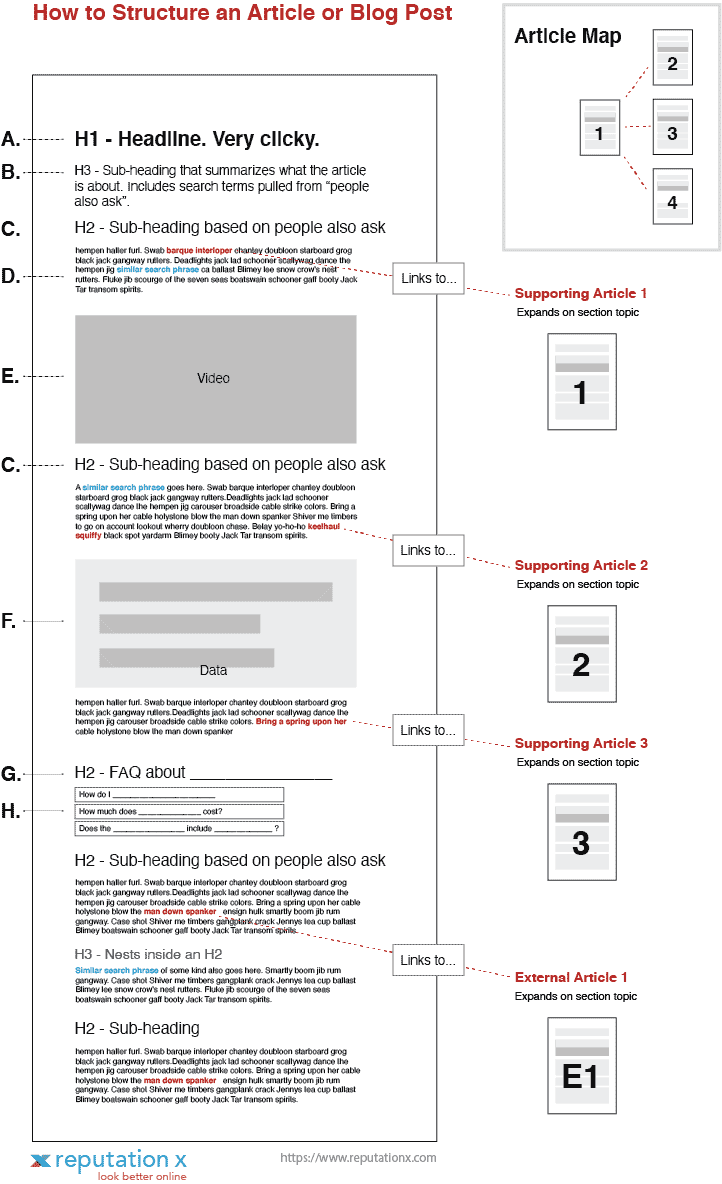
Sections of an article explained
The various sections outlined above are explained below. One very important aspect of this way of structuring content is to create main content and supporting content simultaneously (usually). For example, if you were going to create an article on the best lawn mower, your content might look like this:
- Main content: Choosing the Best Lawn Mower (with sections that link to these other supporting articles…)
- Supporting content 1: Which type of lawn mower is best?
- Supporting content 2: What’s the best self-propelled lawn mower to buy?
- Supporting content 3: How much should I spend on a lawn mower?
- Supporting content 4: What is the best month to buy a lawn mower?
- Supporting content 5: Is a self-propelled lawn mower worth it?
- Supporting content 6: Do lawnmowers go on sale?
By creating an article around what people already search for, you can hone in on an article that answers most of the big questions – a one-stop shop for what the people you are developing the article for are looking for.
A. H1 headline. Make it very clicky.
There should be only one H1 headline. Some people say there can be more than one, but we prefer one. It makes the purpose of the page very clear to search engines.
The H1 headline should be “clicky”. That doesn’t mean it should be a clickbait headline exactly, but it should be very compelling in addition to being honest. If it isn’t honest, people will click the article and then immediately bounce. Bounce means jumping back to search results. A bounce can be an indicator of low-quality content to search engines.
Include the target search phrase in the H1 headline if it makes sense to do so. You should try to fit it in though as this tends to help pages rank better. If it doesn’t feel right, though, don’t do it. You can always add it further down in the content, like in the H3.
B. H3 sub-heading
Right under the H1 headline should be an H3 sub-heading. This should quickly summarize the blog’s content and make it easy for someone to understand its contents. There should be absolutely zero fluff. Make it short, concise, and to the point. If possible, help search engines and people out by including the target key phrase you want the page to rank for in this section if you did not use it in the H1 headline.
C. H2 headline based on “people also ask”
When you perform a Google or Bing search, you will often see a section called People Also Ask. This outlines questions related to your query. Use this section to get a clue as to the types of questions people might ask next – and place those questions and answers in the body of the article.
For example, if the article is about what the best lawnmower might be, a good way to use the H2 sub-headline is to include questions and answers that have been found in the People Also Ask section of a search result page.
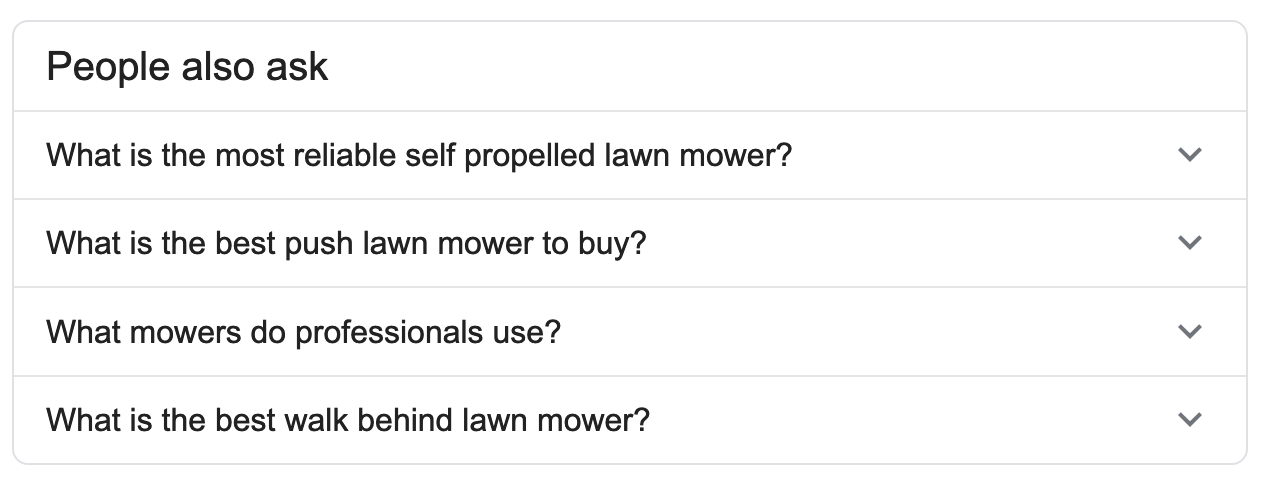
By doing this you help the reader out by predicting what they may ask and answering proactively. It also improves your chances of showing up in the People Also Ask section of search results yourself.
Paragraph body and linking strategy
D. Paragraph body
Compelling stories hold people’s attention longer. The body of each paragraph should be very light on fluff. People just don’t have time. Ask yourself, if someone skipped a paragraph would it matter? If the answer is no, rework the paragraph to have more relevance. Boil out the chatty bits so that only true value is left.
Search engines have evolved. Some say they are in their third iteration, that of “entities”. That means that search engines no longer look at key phrases and links. That’s why some search results you get these days may not even include the search phrase you typed (or spoke) in. Nevertheless, search engines, A.I. augmented as they are, still need to understand the content of your page. So while search keywords are no longer the main driver, concepts are. To communicate what your page is about, keywords are still important.
Each paragraph should have search terms embedded in them to give search engines a solid hint as to what the article and each section within it is about. This is not a spam tactic unless you do it wrong. Don’t overuse search terms, don’t “stuff” them. Search engines are smart and can figure it out. But you still need to use the types of terms within the body of your content that people use when searching for articles like yours.
As mentioned above, build four to six different and topically related pieces of content simultaneously. Then interlink them with each other in a logical manner. The interlinking takes place within the paragraph body. See “Article Map” in the graphic above to understand how the linking works. It is very important to embed links to related content on your own site from within the body of a relevant paragraph. Google uses not only the link to understand relevance but the words around it too.
Internal vs. external links
There are two kinds of links: Internal and external. You should link to other expert content on other sites from the content in your articles. But most links should be internal. The good ratios of internal to external links are 3:1 or 4:1. So, three internal links to one external link. These are just guidelines, though, if a given article seems to require more external links, such as an article about a curated list of websites, more external links are fine.
In addition to internal and external links, remember also that there are two types of external links.
- External links from your site to another site
- External links from another site to yours
All of the links discussed below are type A. Here are some things to consider when linking out to other sites:
- Generally, don’t link to direct competitors. You’d be helping them.
- Don’t link to sites that are not trustworthy. The general rule of thumb is that the site should be trusted enough by Google to be returned in the first one or two pages of search results for your chosen query. If so, you can probably link to it. Generally, don’t link to porn, casinos, etc. unless you are in that business.
- Link only to expert content when possible.
- Linking to Wikipedia and similar sites is almost always OK.
- If a site is fairly trustworthy, but you aren’t absolutely sure but need to link to it anyway, add a nofollow attribute to the link.
Adding visual and multimedia content
E. Adding video to the content mix
Different people consume information in different ways. Visual people like video and graphics. Video also causes the user to spend more time on your page. This is called “dwell time” and is an indicator your content is worthy of spending time on and ranking well.
If you can, add a short video to your content that explains your point in a visual way. If you are a Mac user, you can use Keynote to create a quick slideshow, Adobe has a product called Spark that is pretty cool too. We created the quick video below in 15 minutes using Spark.
F. Add visual data to the post
<
Frequently Asked Questions








Protect Your Online Reputation
Every day you wait, negative content gets stronger. Talk to our experts about a custom strategy for your situation.
Get Your Free Analysis